Axiso解决跨域访问
这里以访问豆瓣Top250为例,直接访问如下:
this.$axios.get("http://api.douban.com/v2/movie/top250").then(res=>{
	console.log(res)}).catch(err=>{
	console.log(err)})
当我们运行程序后,控制台报错如下:
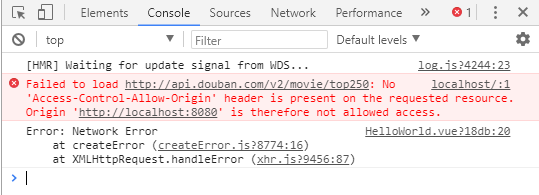
可以看到浏览器拦截了我们的请求,因为我们跨域了,下面解决跨域问题。
Step1:配置BaseUrl
在main.js中,配置下我们访问的Url前缀:
import Axios from 'axios'

Vue.prototype.$axios = Axios
Axios.defaults.baseURL = '/api'
Axios.defaults.headers.post['Content-Type'] = 'application/json';

Vue.config.productionTip = false
关键代码是:Axios.defaults.baseURL = '/api',这样每次发送请求都会带一个/api的前缀。
Step2:配置代理
根目录vue.config.js中
module.exports = {
devServer: {
proxy: {
'/api':{
target: 'http://www.51huicun.com/api',
ws:true,
changOrigin: true,
pathRewrite:{
"^/api":''
}
}
}
}
}
Step3:修改请求Url
修改刚刚的axios请求,把url修改如下:
this.$axios.get("/movie/top250").then(res=>{
	console.log(res)}).catch(err=>{
	console.log(err)})
Step4:重启服务
重启服务后,此时已经能够访问了:
<< 上一篇
下一篇 >>